Flowrensic for Temporal
See what your Temporal workflows hide.
Temporal tells you a run is running or completed. Flowrensic reads its history and tells you what went wrong: which run, which step, after which deploy.
What it finds in your Temporal setup
- Stuck runsRuns that wait forever, signals and updates nobody handled, and runs everyone forgot about.
- Histories that keep growingRuns whose history grows without end, caught before they reach the Temporal history limit.
- Retries that never helpErrors a retry cannot fix, activities that need too many attempts, and long activities without heartbeats.
- The workflow type behind the billBillable steps counted per workflow type, so you see which one costs the most.
- Deploys that break old runsReal histories replayed against your new code, for each deploy.
- Worker and server healthSlots used up, missing pollers, growing backlogs, read from the Temporal metrics you already have.
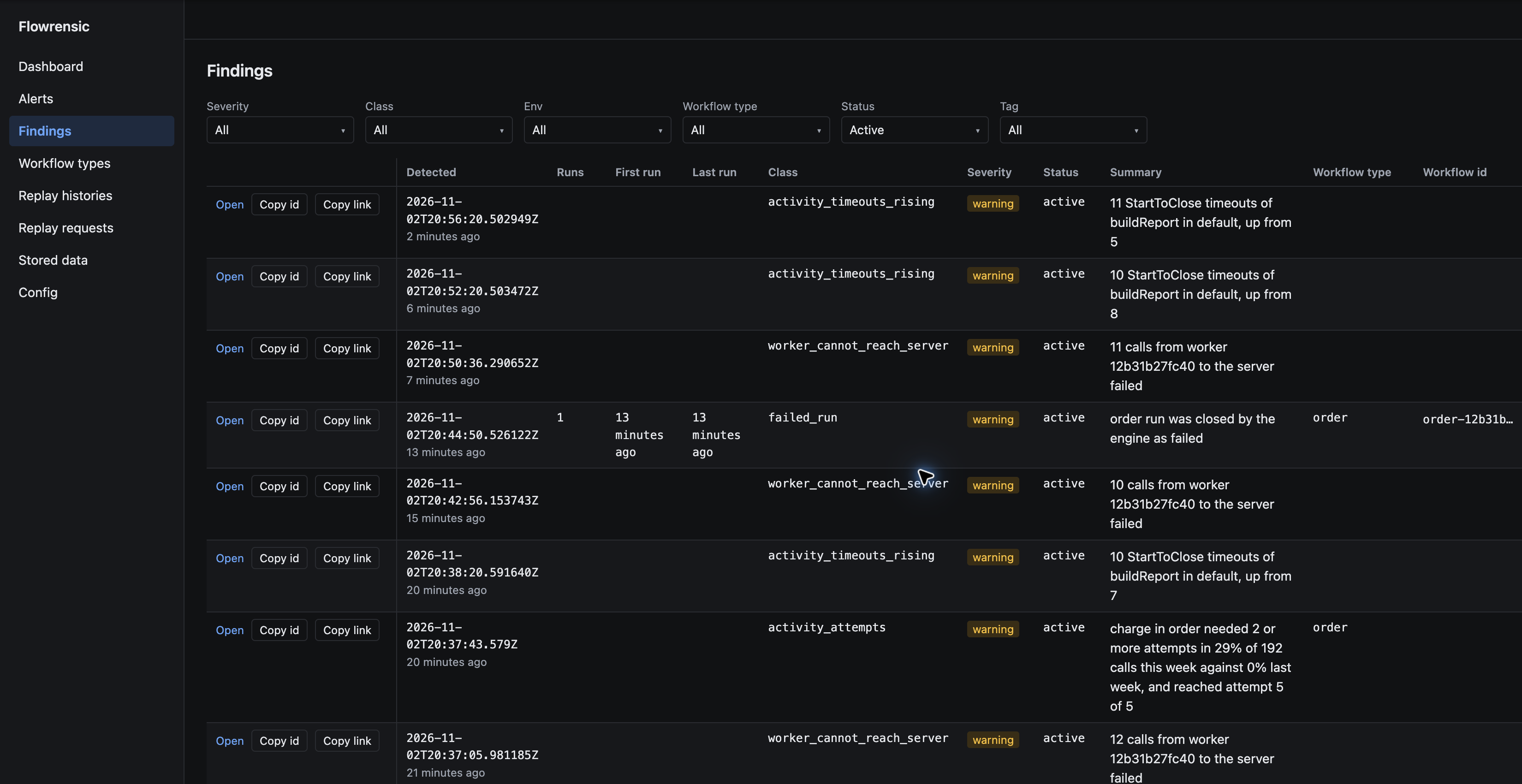
Every problem is a finding
The findings page of the quickstart setup, with its demo worker running.
How it fits next to Temporal
- Runs in your own setupDocker Compose on one machine, or AWS with Terraform.
- SDKs for your workersGo, Node, Java, Python and .NET.
- Never in the wayA Flowrensic failure never harms Temporal or your workers.
Run it yourself
Run Flowrensic locally with Docker and connect a Temporal worker.